2025 Secret Santa Fundraiser
How It Works
If you've already donated to a previous year's Secret Santa fundraiser, many things will look familiar. However, there are a few wonderful additions to know about! Here's a quick and easy tutorial on the new features and how to navigate, add to cart, checkout, etc.
In General
ACCOUNTS: If you had an account on our previous fundraiser site, you'll have to create a new account here. We will be importing data from the other site, so it would be helpful if you create your new account using the same email address. To create a new account, scroll down to the bottom of the fundraiser page and click on "My Account." NOTE: You do not need an account to donate. You can still check out as a guest, and you do not need to create a password unless you want to donate again to a Special Horses fundraiser. If you decide to create a password, it makes the checkout process a bit faster next time.
SHARING: If you want to share this fundraiser on Facebook, Twitter/X, or Pinterest, look for the share links to the right of each horse's photos.
Navigating the Fundraiser Page
THE FIVE RESCUE GROUPS AND THEIR HORSES: Scroll down the fundraiser page and click on the logos of the five rescue groups to read more about them and see the horses who are asking Santa to grant their wishes this holiday season. Click on a horse's photo to read their story and see their Wish List. Also, under each horse's main photo, click on the thumbnails to see additional photos, their letter to Santa, and pictures of their Wish List items. The letter tells Santa, in their own words, why they are asking for his help.
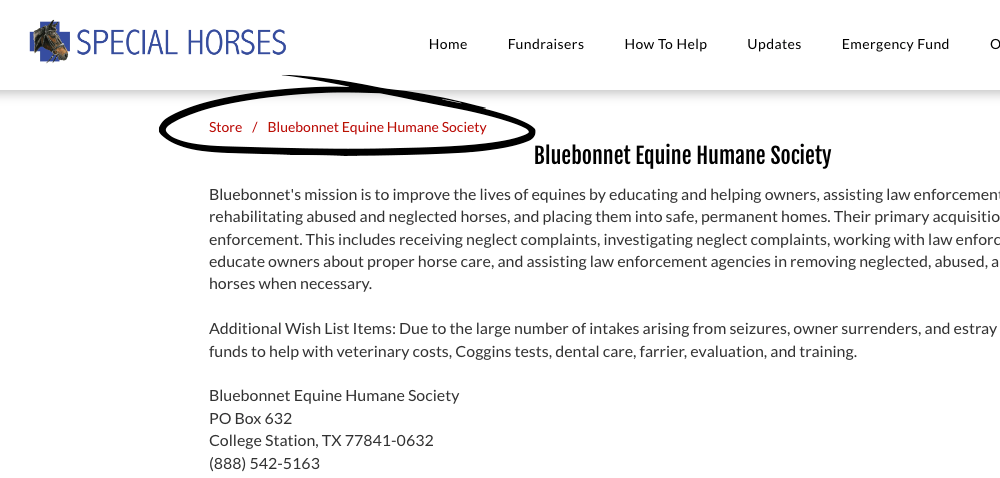
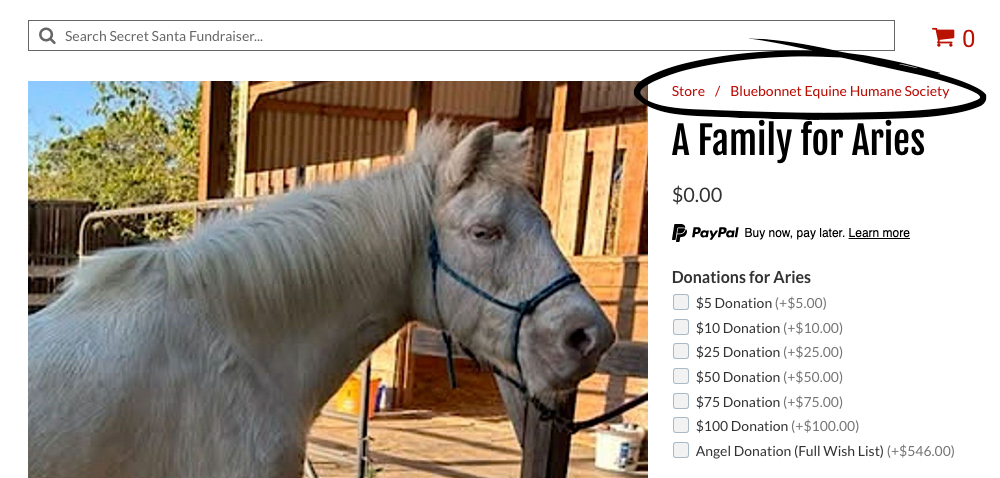
BREADCRUMB MENUS: The breadcrumb menus—easy to see in red!—will allow you to quickly navigate within the fundraiser. When you're on a rescue group's page, look for the red breadcrumb menu located above and to the left of the rescue group's name (see the image on the left, below) If you want to go back to see all five rescue groups, click on "Store." When you are on a horse's page, look for the red breadcrumb menu located above the horse's name. You can click on the rescue group to go back to their page, or click on "Store" to take you back to see all five rescue groups (see the image on the right, below).
BREADCRUMB MENU ON THE RESCUE GROUPS PAGE:
BREADCRUMB MENU ON EACH HORSE'S PAGE:
How to Donate
WISH LIST ITEMS: Start by reading each horse's letter to Santa, located by clicking on its thumbnail under the main image of the horse, then scroll down and read what's on the horse's Wish List in the description.
THREE WAYS TO DONATE: There are three ways to donate: (1) You can donate money to send to each horse; (2) you can "buy" items from their wishlist here in the fundraiser; or (3) you can click on one of the links at the bottom of each horse's page to buy Wish List items directly and send them to the rescue.
NEW DONATE FEATURE: To the right of each horse's photo are checkboxes that include monetary donations and Wish List items. You can choose how you want to help and click as many boxes as you want. Any amount is appreciated! When you click or unclick the checkboxes, the total will automatically adjust. (For example, if you click on the $5 and $10 donation, the total will add up to $15.)
DONATING TO MORE THAN ONE RESCUE AND MORE THAN ONE HORSE:
You can add donations to your cart and then navigate to any of the other rescue groups or horses and add donations for them as well. When you're done, simply go to your cart and check out. The red cart icon is located to the right of the search box (above the rescue groups and horses), and you can also scroll down to the bottom of the page and click on "Shopping Bag." Everything you've chosen to donate will be itemized in your cart, and you can adjust quantities and totals there if you need to.
ANGEL DONATIONS: To the right of each horse's photo, there is a checkbox for an "Angel Donation." Angel Donations will buy everything on each horse's Wish List! Know that every donation, no matter how small, is a blessing. But if you have the means and want to make an Angel Donation, it would be wonderful!
PAYMENT OPTIONS: You can pay for your donations using PayPal or Venmo—a pop-up will ask you to log in to your account to complete your purchase. You can also choose to pay using PayPal Credit, a check, or a money order.
GET HELP:
If you need help, please text or call Wendi at 314-303-8368. You can also use the button below to contact her via email.